Trigger scopes
Activity Description
Define various event monitoring and triggering scope activities, need to be used in combination with trigger related activities, when the conditions in the [Trigger Activity] area are met, the activities in the [Operation] area of the trigger will be executed.
Note: If you want to jump out of the trigger scope, you need to pair it with the [Interrupt] activity. The activity in the [Operation] area needs to be placed in the timing diagram.

Attribute Description
Continue after error
When an exception occurs in the execution of an activity within [operation], choose whether to jump out of the trigger scope activity and continue with the execution of subsequent activities
Scheduling Mode
Scope's scheduling mode, can be selected from the drop-down list
- Sequential: when multiple triggered actions are detected, the process within the [Operation] scope will be executed once in full, and then continue to execute the process within the [Operation] scope according to the number of times the trigger was triggered.
- Concurrent: when multiple triggers are detected, the process in the [Operation] area for each trigger will start executing at the same time.
- Single execution: no matter how many times the trigger action is detected, the process in the [Operation] area will be executed only once.
Usage Example
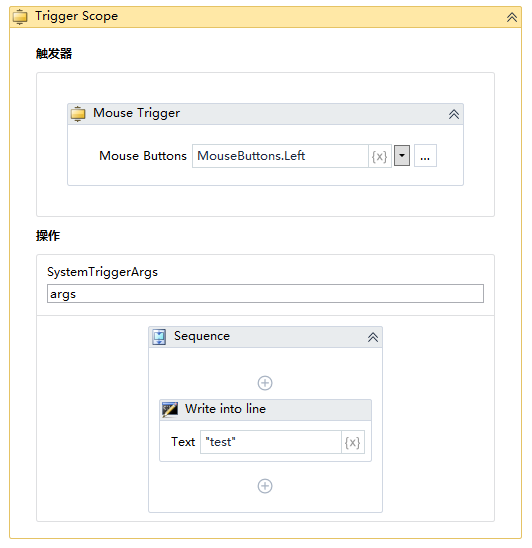
Execution steps: Left mouse button click, trigger left mouse button click event to enter the operation, write to test, after execution, execute the interrupt operation behind.