New columns in data tables
Activity Description
You need to build the data table first, insert columns into the data table, fill in the corresponding column names, and you can also assign default values, this activity needs to be executed together with the data table building activity.
This activity needs to be executed together with the Build Data Table activity !
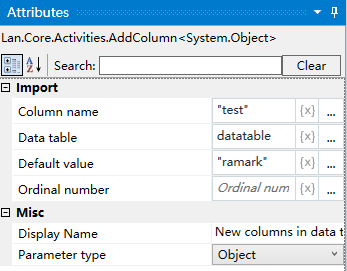
Property Description
Column name
Enter the name of the corresponding column, type bit string, e.g. “Notes”.
Default Value
Enter the default value of the corresponding column, it can be null.
Data Table
Enter the name of the constructed data table
Example of using
Execution steps: Create a data table - add a new data table column “Remarks”.