Setting fonts
Activity Description
You can set the font for the selected content, the default is isometric, you can output by yourself: italic, running script, cursive, regular script, imitation Song and other fonts, the way to enter the string
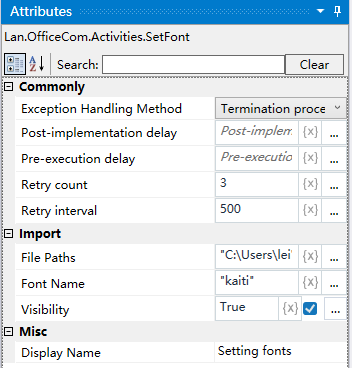
Property Description
Document Path
Enter the full path of the corresponding document, or you can choose to select it directly
Font Name
Enter the name of the corresponding font as a string.
Usage Example
Execution steps: Select the content of the document, set the name of the font, for example: italic ----- to see the effect of the settings