FTP Connection
Activity Description
Open a scope for FTP upload or download. Once you fill in the IP, all activities dragged into the scope will use the same IP, so there is no need to fill in the IP again!
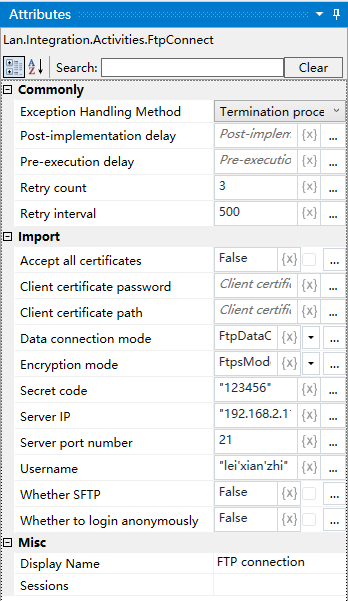
Property Description
FTP Server
The IP address of the FTP server to which you want to connect, e.g. “192.168.2.115”, or the IP address of your own computer if you are using a local build.
Port number
Default 21, if there are other ports, according to the actual fill in
Encryption mode
Whether to encrypt the transmission, the default is none, you can choose: explicit, implicit
User name
Login FTP server user name
Password
Password for logging into the FTP server
Usage Example
Note: Port 21 is the default port in “FTP Connection” activity, make sure port 21 is available.