Read the keys
Activity Description
Read key value
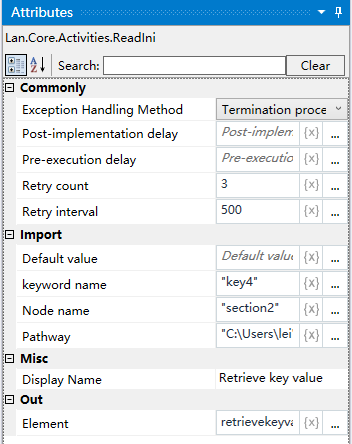
Property Description
Output content
Outputs the value of a key under a subsection in the “.ini” file as a variable.
Key name
input key name, for example: key4
Node name
Attributes in the “.ini” file, similar to the “first level menu” of a tree structure, e.g. section2.
File Path
Input the file path of the ini file.
Default value
Set the default value, if there is no such key, then return the default value.
Usage Example
Execution steps: Run the project, it will find the absolute path of the specified “.ini” file, and according to the incoming subsection name, it will get the value of the key corresponding to the subsection name, and assign it to the variable, if not, it will return to the default value.