Product Overview
Preface
Quick Start
New Process
Design Release Project Flow
Activity Component Library
AI
Image Recognition
Image CAPTCHA
Application
CSV
Write CSV
Read CSV
Database
Close database connection
Connect to database
Execute sql statement
Multi Row Query
Single row query
Bulk Insert Data
Excel
Column coordinates to index
Find Cells by Background Color
Get cell background color
Extracting cell values
Extracting cell formulas
Write cell values
Bottom additions
Copy and Paste Selection
Delete Selection
Excel Lookup
Get Sheet Content Selection
Merge/unmerge cells
Get Selection Contents
Setting font properties
Setting the background color of the selection
Write-in constituencies
Delete row
GetColumns
Get Rows
Get Columns
Get Row
Write to columns
Write into line
Workbook scopes
Copying worksheets
New Worksheet
Deleting Worksheets
Get sheet name by index
Get all worksheet names
Moving Worksheets
Renaming worksheets
Column indexes converted to coordinates
Delete column
Execution Macro
Calling VBA
Save excelfile as
PDF
OFD to PDF
PDF Extract Image
PDF Extraction Forms
Merge PDF documents
Save PDF as
PDF to Image Conversion
PDF parsing
Word
Close word program
Close Document
Find Text
Get document path
Insert carriage return
Insert Hyperlink
Insert new page
Insert picture
Move cursor position
Open Document
Read document
Batch Text Replacement
Save file as
Unanimous
Copy
Cut
Deletion
Paste
Read selected text
Select line
Setting Alignment
Setting fonts
Setting font color
Setting font size
Setting font styles
Document Scope
Write document
Console
Credentials
Get Configuration
Getting Store Credentials
Setting Store Credentials
Data processing
Data table
New columns in data tables
Building Data Tables
Get Data Columns
Get data rows
Modifying Column Information in a Data Table
Table Add Rows
Table Data Connections
Delete data columns
Delete data rows
Data table de-duplication
Table Find Data
Intersection of data tables
Merge data tables
Data Table Slices
Data Table Sorting
Time
Change the time
Time-to-time stamp
Date-Time Conversion
Construction date
Generation time
Acquisition Day
Get Hours
Get Minutes
Get month
Get current time
Gain Seconds
Access time
Access to time segment
Get timestamp
Get current date
Determine the day of the week
Get year
String to Time
Determine if it can be converted to time
Calculate time difference
Data arithmetic
Generate random integers in a range of integers
Get absolute value
Take the tangent value
Take the cosine of
Get integer value
Get logarithmic value
Take the Nth power of the natural logarithm
Round up to the nearest integer
Take the cube root
Take the plus or minus sign ±
Take a sine value
Take the tangent
addition, subtraction, multiplication and division of two numbers
regular
Regular expression matches the nth
Regular expressions match all
Regular expressions match the first
Regular Expression Matching Test
String
ASCII Converted Characters
Get string byte length
Center cut
String comparison
Creating strings
Extract Chinese or numbers
Find String
GetCharacter
Get Intermediate String
Get whether the string is a url
Left Intercept String
Left cropping
Get string length
Lowercase string
String Replacement
String Flip
Right Intercept String
Right Crop
String splicing
String split
Trimmed on both sides
String to ASCII
String capitalization
String to Secure Text
General
Configuration
Get a unique string of characters
Console
Check False
Check True
Process control
Throw
try catch exception handling
Termination of workflow
Rekindle
Assign
If Condition
Sequences
Parallel traversal loops
Write into line process
Disruptions
Comment out
Continued
Delay
Throw an exception
Ergodic cycle
IfElseIf
Dowhile
While
Execution code
Referencing process
Log Messages
Multiple assignment
Scope of retesting
Trigger Scope
Flowchart
Process Decision Making
Flowchart
Flowchart Switch
Python
Executing Python code
Execute Python file
State Machine
State machine
final state
Interface automation
Browser
Additional Browsers
Close other tabs
Close current tab
Get Cookie
Browser Execution JS
Maximize Browser
Minimize Browser
Be back
Go forward
New Browser
Jump to page
Refresh
Waiting for page to load
Element operations
operations
Element existence judgment
Element Screenshot Save
Wait for the element to disappear
Waiting for an element to appear
Grab Tables
Get the first element to appear
Remove Element Attributes
Get
Get element tick status
GetChildElementList
Get element
Get element coordinates
GetElementTextContent
Getting the state of an element's checkbox
Keyboard
Send Safe Text
Send Text
Mouse
Element Click
Hover
Set
Setting Element Checks
Setting Element Attributes
Setting element text
Setting Element Selection
Image matching
Image click
Whether the image exists
Image Search
Wait for the picture to appear
Wait for the image to disappear
Image similarity
Image contains
Windows
Additional window
Get Active Window
Move window position
Window closes
Window hiding
Maximize window
Minimize Window
Restore window size
Activate and display window
Window topping
Mobile Automation
Mobile Device Connectivity
Devices
Get page source
Managing Applications
Press the navigation key
Screenshot
Element operations
Elemental presence
Roll over
Setting element text (mobile)
Element click (mobile)
Mouse keyboard
keyboard
Send key
Send Text
Keyboard long press
Mouse
Drag
Click
Hover
Rollers
Internet
feishu
Flying Book Group Notice
Get call credentials
Upload image
FTP/SFTP
FTP connection
FTP file download
sftp/ftp file upload
HTTP
Nail Group Robot
Enterprise WeChat Group Robot
HTTP Download File
Send http request
Clear all sessions
Get session info
SSH
Ssh command
Systems
Authenticator
Get TOTP verification code
Clipboard
Copy selected text
Getting Clipboard Contents
Setting the Clipboard
Add files to the clipboard
Data processing
Base64 decoding
Base64 encoding
Dialog box
Customized pop-up windows
Dialog box
Message alert
Timing off message alerts
Save file as
Select File
Select Folder
Execute script
Calling batch scripts
Calling PowerShell Scripts
File
Copy
Copy Folder
Creating Folders
Create file
Delete Folder
Delete file
Move files
Moving Folders
Path exists
Rename file
Rename Folder
Search for documents
Unzip file
Write to text file
Compressed files/folders
init file
Delete key-value pairs
Delete subsection
Enumeration keys
Enumeration of subsections
Retrieve key value
Write key value
Read text file
Get the list of files
Get file size
Reading text files
Input method
Switching Keyboard Layout
Document printing
Print document
Print PDF documents
process management
Kill process
Whether the process exists
Implementation process
Lock screen
Lock screen
Unlock the screen
Screenshot
Save Screenshot
Matrix
Get Intranet Ip
Get local MAC
Audible alert
Get system folder
Get system environment variables
Getting system processes
Windows credentials
Add Credentials
Delete Credentials
Access Credentials
Triggers
Keypad trigger
Mouse Trigger
End-of-process trigger
Process Start Trigger
USB
Send key (virtual keyboard and mouse)
Published with GitBook
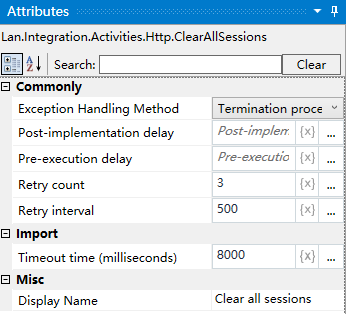
Clear all sessions
Clear all sessions
Activity Description
This activity clears all session information for the corresponding session.
Usage Example
results matching "
"
No results matching "
"