Compressed files/folders
Activity Description
Compresses a file or folder to a specified directory and returns the filename

Property Description
Compressed file full path
Output the full path of the compressed file as a variable
Compression level
Select the compression level from the drop-down box, you can choose storage only, very fast compression, maximum compression, standard compression
Path of compressed file
Input the full path to save the compressed file
Name encoding
Select the name encoding from the drop-down box
Whether to overwrite
Select whether to overwrite, default is “Yes”
File or Folder Path
Enter the full path of the file or folder to be compressed
Path to compressed file
Input the full path list of the file or folder to be compressed.
Zip file name
Input the name of the compressed file
Example of using
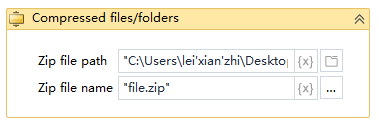
Execution steps: Run the project, the program will find the specified file or folder to be compressed, the newly generated compressed file has the file name of the specified compressed file name, and generated to the specified path