Delete Selection
Activity Description
Delete the contents of a specified selection in an Excel worksheet
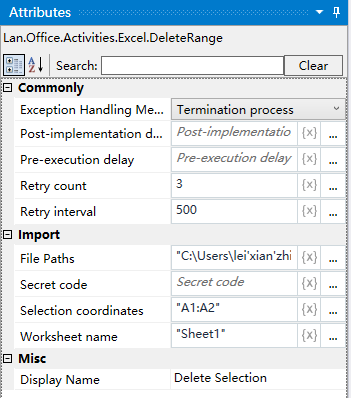
Property Description
Worksheet name
Fill in the name of the Excel sheet to copy the cell contents of the corresponding sheet.
File Path
Fill in the full path of the Excel file (you can also click on the icon to the right of the input box to select the full path of the file)
Constituent coordinates
need to delete the content of the region coordinates, the default value is: “A1: A2”, can be modified according to the actual situation
Usage Example
Execution steps: Delete the contents of the region A1: A2 in the Excel table, Sheet1 worksheet - view the results of the operation
Note: When executing the activity, first close the Excel file used for the activity.