Setting the background color of the selection
Activity Description
Sets the background color of the cells in the specified region

Property Description
Region coordinates
Set the region coordinates, such as: “A1:B7”, you can fill in according to the actual situation
Color
visualization of the drawing board, you can freely choose the color
Color name
Select the color by the color name, note: when the “color” attribute is set, the attribute is invalidated.
Worksheet name
Fill in the name of the Excel sheet.
Full path to the file
Fill in the full path of the Excel file (you can also click the icon to the right of the input box to select the full path of the file).
Example of using
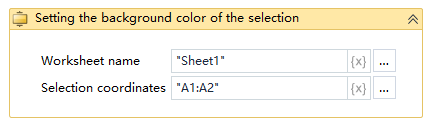
Executive Steps: Excel table, Sheet1 worksheet in the A1: B7 region of the background color is set to orange - view the results of the operation
Note: the implementation of the activity, the first to close the activity needs to be used in the Excel file